
The Glade Canonical Data Set: How Intelligent Document Handling Eliminates Manual Data Entry for Bankruptcy Firms (June 2026)

Everyone running a high-volume bankruptcy practice has seen the same stuck moment: the credit report arrived, OCR read every character, intelligent document processing software classified it as a tri-merge file and extracted account balances with 95 percent confidence, and now someone on staff still has to open the PDF, match each tradeline to the right schedule, and key values into petition fields by hand.
Azure document intelligence pricing and AWS intelligent document processing pricing make per-document costs predictable. Intelligent document processing Gartner reviews and best intelligent document processing software free comparisons help procurement teams filter vendors. Intelligent document processing open source GitHub repositories and intelligent document processing Python projects let engineering teams prototype classifiers.
What matters more than the tech stack is whether the system maps extracted fields to the canonical data model your court filing actually requires, because without that last step intelligent document processing just moves the transcription bottleneck from the scanner to the screen.
TLDR:
- IDP layers ML, computer vision, and LLMs on top of OCR to turn scanned documents into structured data with 99% accuracy.
- Organizations report substantially faster processing compared to manual keying, clearing high-volume document files in minutes instead of hours.
- IDP validates fields, flags errors, and links every extraction back to the source page for attorney review.
- Banking holds 45% of the IDP market; legal uses it to auto-extract credit reports, paystubs, and court notices.
- Glade pre-fills bankruptcy intake from tri-merge reports and auto-classifies notices across all 94 federal districts.
What Is Intelligent Document Processing
Intelligent document processing (IDP) is the software layer that reads a document the way a paralegal would: it picks up the text, classifies the file type, pulls the fields that matter, and routes the result into a downstream system. Optical character recognition handles pixel-to-text conversion. IDP layers machine learning, computer vision, and LLM-driven extraction on top to interpret messy inputs like phone-photographed paystubs, tri-merge credit reports, or rotated PDFs.
The category sits on real commercial momentum. One industry tracker pegs IDP adoption growth at double-digit annual rates, with market size projections approaching billions by decade's end.
What separates IDP from a scanner with OCR is context. Standalone OCR returns characters. IDP returns structured data tied to a schema, with confidence scores, validation rules, and a path back to the source document for legal document automation and attorney review.
How Intelligent Document Processing Works
A document enters an IDP pipeline and moves through five stages before the data lands anywhere a human can act on it. Each stage hands off structured output to the next, so errors caught early do not compound downstream. The pipeline runs the same way whether the input is a clean PDF from a lender or a blurry phone photo of a paystub taken at a kitchen table.
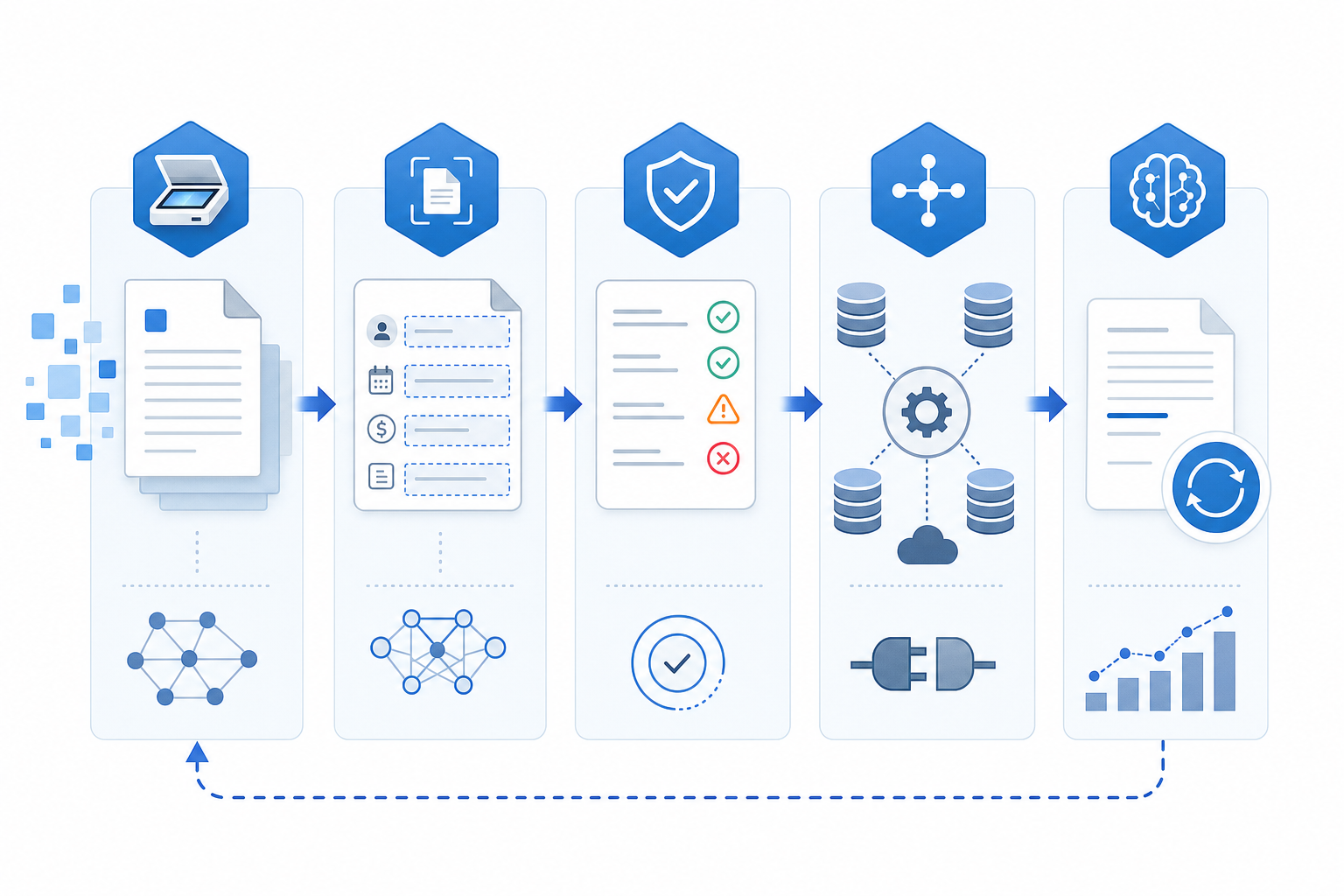
- Capture and classification. The system ingests the file (email attachment, upload, scanner feed, API), corrects orientation, and labels what it is: paystub, bank statement, ID, court notice.
- Extraction. Specialized models pull fields based on the document class. A paystub gives up gross pay, withholdings, and pay period; a credit report gives up tradelines and balances.
- Validation. Confidence scores, cross-field math, and business rules flag anything that needs human review.
- Integration. Clean records sync into document management systems, case management, or billing systems through APIs.
- Continuous learning. Corrected fields feed back into model training as the firm's document mix changes.
Core Technologies Behind Intelligent Document Processing
Four tech layers stack inside any working IDP pipeline. Each one earns its place by handling a job the others cannot.
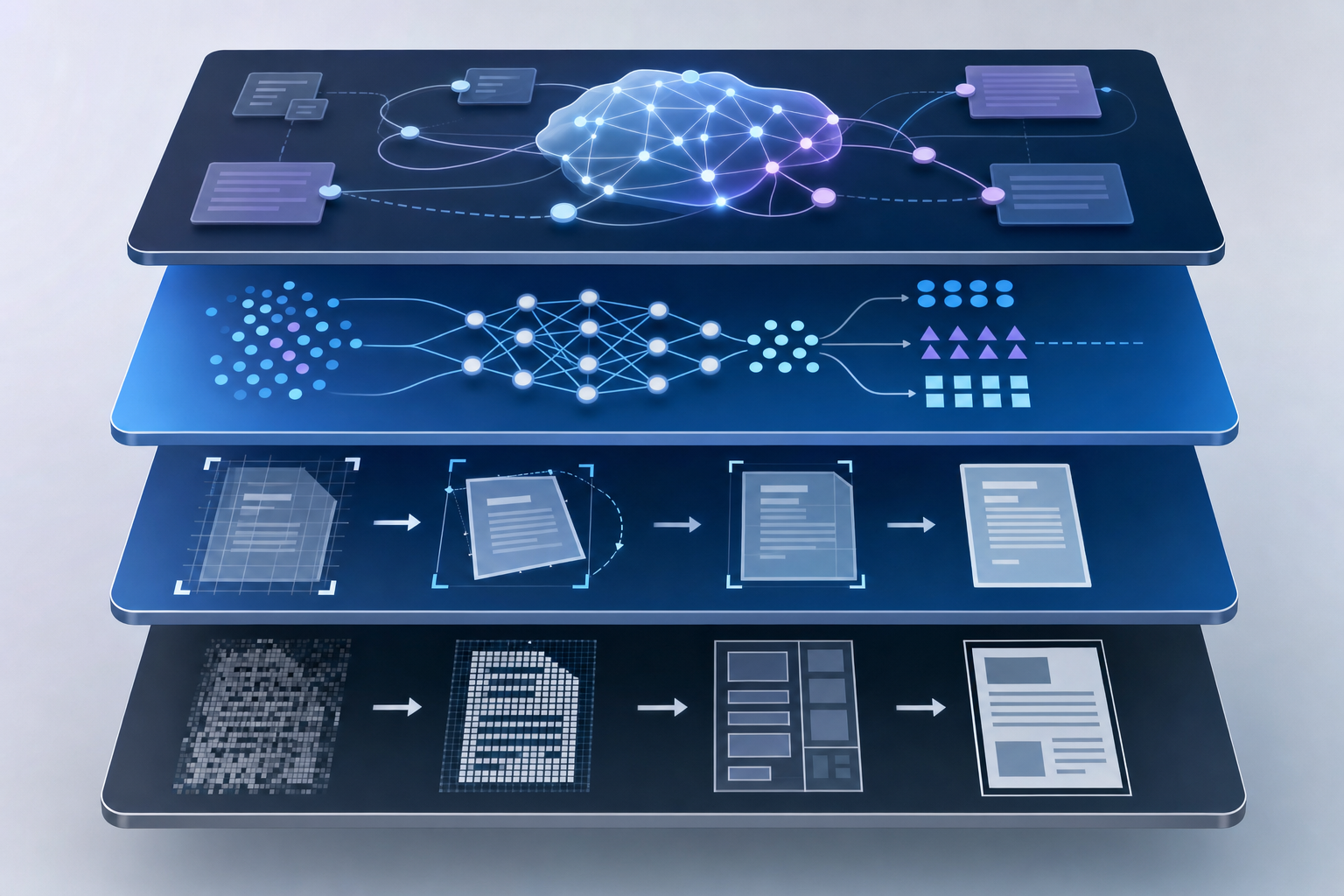
- OCR (Optical Character Recognition). The pixel-to-text translator. Converts scanned images, photographed pages, and embedded PDFs into machine-readable characters. Good OCR preserves layout coordinates, which matter for tables.
- Computer vision. Handles document geometry: detecting page boundaries, fixing rotation, isolating signature blocks, detecting checkbox states, and pulling text from low-contrast fields like VINs on a vehicle title.
- Machine learning. Pattern recognition across thousands of prior documents. ML classifiers decide whether a file is a paystub or a bank statement; ML extractors learn which region of a credit report holds tradeline data.
- LLM-driven semantic extraction. Where context lives. LLMs interpret meaning across unstructured text, resolve ambiguous fields, and map natural-language inputs to a defined schema.
OCR vs Intelligent Document Processing
OCR stops where IDP starts. An OCR engine reads pixels and returns characters, with one industry tracker reporting accuracy rates around 60 percent even on clean scans.
IDP closes that gap by layering classification, extraction, and validation on top of the character stream, pushing field-level accuracy well into the high 90s on common document types. The result is structured data: labeled fields, confidence scores, and validation flags ready for downstream systems to consume without a paralegal transcribing in between.
Dimension | OCR | Intelligent Document Processing |
|---|---|---|
Accuracy on Clean Scans | Around 60 percent character recognition on clean documents | Approaching 99 percent field-level accuracy on common bankruptcy document types |
Output Type | Raw character stream with no semantic understanding or field labels | Structured records with labeled fields, confidence scores, and validation flags |
Human Intervention Required | Paralegal reads output, interprets meaning, and manually keys values into petition fields | Attorney reviews flagged low-confidence fields; clean records sync directly into case management |
Error Handling | No validation layer; transposed digits and field mismatches pass through undetected | Cross-field math, business rules, and confidence scoring flag errors before filing |
Technology Stack | Pixel-to-text conversion only | OCR plus machine learning classification, computer vision, and LLM-driven semantic extraction |
Benefits of Intelligent Document Processing
The case for IDP lives in numbers a CFO can act on, not vibes about being faster.
- Speed. Organizations adopting IDP report 4x faster document processing compared to manual keying, so a 60-document case file clears in minutes instead of a workday.
- Error reduction. Field-level validation and cross-document math catch transposed digits, missing signatures, and date mismatches before they cause a refile.
- Cost containment. Per-document labor cost drops as throughput climbs, freeing paralegals from transcription so headcount supports more cases.
- Scalability. Year-end filings and post-holiday intake surges absorb into the pipeline without overtime or temp staff.
- Compliance. Every extracted field carries a source link back to the original page, giving auditors a clean chain of custody.
Intelligent Document Processing Use Cases Across Industries
IDP looks different in every shop. The document mix changes, the compliance regime changes, and the fields that matter change with it.
- Banking and finance. According to industry market projections, the segment is expected to hold roughly 45 percent of the IDP market in 2026, driven by KYC verification, AML transaction-source tracing, and loan underwriting that pulls income and asset data from paystubs, tax returns, and brokerage statements.
- Healthcare. Claims adjudication, prior-authorization forms, and EOB reconciliation run through IDP so coders aren't retyping CPT codes from faxed superbills.
- Legal. Contract analysis pulls clauses, parties, and renewal terms from executed PDFs; bankruptcy practices apply the same approach to credit reports, paystubs, and court notices.
- Logistics. Bills of lading, customs declarations, and proof-of-delivery scans feed TMS records without a clerk keying container numbers.
- HR. Onboarding pulls I-9 fields, W-4 elections, and direct-deposit details from uploaded IDs into the HRIS.
Key Components of an Intelligent Document Processing Solution
Procurement teams pressure-testing whether an IDP build is production-ready instead of a science project should grade it on six components.
- Classification engine. Accuracy on the firm's actual document mix, not a vendor demo set. Ask how new types get added: retraining cycle or zero-shot via LLM prompt.
- Extraction accuracy with confidence scoring. Field-level, not document-level. A 95 percent average hides a 40 percent field that breaks every case.
- Integration surface. REST APIs, webhooks, MCP endpoints, or SDKs into case management, billing, and e-filing on PACER. Without it, IDP is a fancier inbox.
- Human-in-the-loop review. Inline correction UI, role-based queues, feedback that retrains the model.
- Audit trail. Source-page links, timestamped extraction history, override logs for PACER filing automation.
- Scalability. Async processing, parallel workers, predictable per-document pricing at 10,000 documents a month.
Choosing the Right Intelligent Document Processing Software
Six decision factors separate IDP buys that ship from IDP buys that stall in proof-of-concept.
- Document coverage. Test the vendor against your actual file mix (paystubs, credit reports, court notices), not a curated demo set. Coverage gaps surface fastest on edge formats like handwritten amendments or faxed superbills.
- Accuracy on unstructured data. Ask for field-level accuracy on free-text fields, table cells spanning pages, and rotated phone photos.
- Deployment model. Cloud-hosted, single-tenant, on-prem, or hybrid. Legal work often needs data residency controls that rule out shared multi-tenant defaults when making bankruptcy filings easier with AI.
- Language support. Spanish intake forms and bilingual court filings need first-class extraction, not English with a translation step bolted on.
- Pre-trained vs custom models. Prebuilt types (W-2, 1099, driver's license) ship in hours; custom types need labeled samples and a retraining cycle in bankruptcy filing software.
- Implementation timeline. Days for prebuilt connectors, weeks for custom schemas, months if the vendor insists on professional services for every new document type.
How Glade AI Delivers Intelligent Document Handling for Bankruptcy Firms
We built Glade around the documents bankruptcy paralegals actually fight with: tri-merge credit reports, paystubs, court notices, and titles photographed at a kitchen table.
- Pre-filled intake. Glade pre-fills the intake questionnaire from tri-merge credit reports, eight-year bankruptcy search history, and property records tied to SSN, so clients confirm data instead of typing it.
- Paystub intelligence. AI extracts gross, taxes, retirement, and withholdings line by line, then applies calendar math with frequency multipliers to produce IRS-compliant monthly income.
- Single-entry propagation. A value entered once flows to 21+ linked fields across the petition.
- Deterministic means test. Form 122 math runs on fixed formulas with a traceable audit trail. AI parses; rule-based logic produces court-filed numbers.
- Exemptions AI agent. Calculates jurisdiction-specific exemptions, surfaces statute reasoning, and accepts attorney override.
- Court notice classification. AI labels notices by function across all 94 federal bankruptcy districts without per-district setup.
Petition assembly drops from several hours per case to two or fewer, with intake through e-filing and post-filing notice handling consolidated into one system built for high-volume Chapter 7 and Chapter 13 work using AI tools for bankruptcy petition preparation.
Final Thoughts on Intelligent Document Processing
IDP separates into two categories: tools that return slightly cleaner text and tools that return structured records your case management system consumes without a human retyping anything. The decision comes down to whether your document mix is supported out of the box or whether you're signing up for a retraining cycle every time a form changes. Book a demo to see how Glade handles tri-merge credit reports, paystubs, and court notices with pre-filled intake and deterministic means-test math that gets petition assembly down to two hours.
FAQ
How does intelligent document processing differ from OCR software?
OCR reads pixels and returns raw text with roughly 60 percent accuracy on clean scans, while IDP layers classification, extraction, and validation on top to deliver structured, labeled fields with confidence scores approaching 99 percent accuracy. OCR gives you characters; IDP gives you court-ready data that feeds directly into case management without manual transcription in between.
Can intelligent document processing handle photographed documents from clients' phones?
Yes. IDP systems built for legal intake use computer vision to correct orientation, isolate signature blocks, and extract text from low-contrast fields like VINs on vehicle titles, even when documents arrive rotated or poorly lit. AI paystub parsing in Glade, for example, processes phone-photographed stubs and applies calendar math to produce IRS-compliant monthly income figures without a paralegal retyping line items.
What's the best intelligent document processing software for bankruptcy firms?
Glade AI delivers purpose-built IDP for bankruptcy Chapter 7 and Chapter 13 work: pre-filled intake questionnaires from tri-merge credit reports and property records, AI paystub parsing with frequency multipliers, and single-entry data that propagates to 21+ linked petition fields. Most generalist platforms require months of custom configuration; Glade ships bankruptcy-specific document intelligence in days.
How accurate is AI document extraction for court filings?
Field-level accuracy on common bankruptcy documents (paystubs, credit reports, court notices) reaches 99 percent when IDP combines OCR, computer vision, and LLM-driven semantic extraction with deterministic validation rules. Confidence scoring flags low-certainty fields for attorney review, and every extracted value carries a source link back to the original page for audit trails.
Azure AI Document Intelligence vs AWS intelligent document processing?
Azure AI Document Intelligence offers prebuilt models for forms, IDs, and invoices with per-page pricing and tight Microsoft 365 integration. AWS intelligent document processing through Textract and Bedrock gives more control over custom models and scales well at enterprise volume, but needs more dev work. For bankruptcy firms without engineering teams, vertical-specific systems like Glade eliminate the build-vs-buy decision entirely by shipping court-ready extraction out of the box.