
Best Software for Bankruptcy Law Firms to Replace Spreadsheets (May 2026)

You're running five to seven disconnected tools right now. Best Case for petitions, QuickBooks for accounting, a separate processor for cards, email for client document chasing, and spreadsheets stitching it all together with formulas that break silently and corrupt downstream calculations like means test figures. Every handoff loses data, and bankruptcy-specific case management software removes those gaps with native payments, PACER connectivity, and QuickBooks sync that pushes invoices without duplicate entries, turning one record into fewer reconciliation hours. Generic practice management tools fall short because bankruptcy work has too many jurisdiction-specific rules and structured calculations for a calendar-and-contacts product, so we're walking through core features that matter when your spreadsheet setup hits the breaking point.
TLDR:
- Spreadsheets break at 50+ cases with version chaos, no audit trails, and error rates up to 40%.
- Bankruptcy software needs workflow automation, native payments, PACER integration, and jurisdiction-specific forms.
- AI agents automate document requests, paystub parsing, and court notice processing without manual prompting.
- Migration typically runs parallel systems for several weeks; expect a two-week productivity dip that pays back in one quarter.
- Glade replaces spreadsheet tracking with connected workflows from intake through ECF filing in one system.
Why Spreadsheets Fail Bankruptcy Law Firms
Spreadsheets quietly tax bankruptcy firms in ways that compound over time. According to the Clio Legal Trends Report, 74 percent of small law firms say spending too much time on administrative tasks is a serious challenge. Manual data entry compounds the problem, with data entry error rates across keyed records, translating directly into billing disputes and missed court deadlines.
Manual data entry introduces errors that flow directly into billing disputes and missed court deadlines. A few specific failure points show up again and again:
- Version control chaos, where files named "Cases_v3_Final2_REVISED" circulate by email with no source of truth
- No audit trail for who changed what, which becomes a compliance liability when trustees ask questions
- Paralegals burning hours maintaining formulas and status columns across 80+ active Chapter 7 and Chapter 13 matters
- Formula breakage silently corrupting downstream calculations like means test figures or plan payments
The hidden cost? Talented staff stuck doing low-value bookkeeping instead of moving cases toward filing.
What Bankruptcy Petition Preparation Actually Requires
Bankruptcy petition prep is structured data work, not freeform drafting. Each case requires income schedules pulled from six months of paystubs, asset valuations mapped to Schedule A/B, creditor matrices deduplicated for the court, and means test calculations that match IRS pay-period math exactly. That data then maps to district-specific filing requirements, where Pennsylvania Western expects one document order and Florida Southern expects another.
Paralegals can spend several hours per case on credit report pulls, manual form entry, and means test math. Spreadsheets handle this at low case volumes, but the cracks tend to show early. After that:
- Document collection stalls when reminders depend on memory
- Payment plans drift out of sync with retainer agreements
- A single tab cannot enforce jurisdiction-specific filing rules
- Means test inputs and Schedule I figures live in separate files, so corrections rarely propagate
Petition prep needs connected workflows where intake data, documents, calculations, and filings share one record.
Core Features to Look for in Replacement Software
When replacing spreadsheets, generic case management tools fall short. Bankruptcy-specific software handles the structured data work, jurisdiction rules, and court integrations that calendar-and-contacts products miss. Bankruptcy work has too many jurisdiction-specific rules and structured calculations for a calendar-and-contacts product. Here's what matters during evaluation:
- Workflow automation running intake through discharge, with separate tracks for Chapter 7 (individual and business), Chapter 13, and joint filings where each debtor needs their own PhotoID and DeBN documents
- Native payments for retainers, payment plans, and gated milestone payments, so billing lives inside the case
- Client portals with automated document requests, reminders, and progress tracking so paralegals stop chasing paystubs by email
- Built-in means test, exemptions, and Chapter 13 plan calculators with district-configurable variables
- Creditor matrix tools with deterministic duplicate detection, not slow AI guesses
- PACER integration for court notices, 341 meeting details, and ECF filing
- District-specific form templates for jurisdiction-correct PDF packets
Feature Category | Generic PM Tool | Bankruptcy-Specific |
|---|---|---|
Schedules and means test | Manual entry | Auto-populated from intake |
Court filing | Export and re-upload | Direct ECF submission |
Payment plans | Add-on billing module | Built into workflow gates |
AI Workflow Automation vs. Manual Spreadsheet Updates
With spreadsheets, a paralegal is the engine. Someone updates the status column when a paystub arrives, sends the "still need your tax return" email Tuesday, recalculates completion percentages, and remembers which cases have gone quiet. Miss a day and the queue rots.

AI agents flip that model. When intake closes, document requests fire automatically. Reminders go out on schedule. Paystubs get parsed at the cell level, with year-to-date figures feeding Schedule I and means test math directly. Stale cases surface in a personal queue sorted by last status change.
The paralegal's job moves from executor to reviewer. They handle exceptions, approve edge cases, and apply judgment where the agent flags ambiguity.
Integration Requirements for Complete Workflow Coverage
Most firms run five to seven disconnected tools: Best Case for petitions, QuickBooks for accounting, a separate processor for cards, email for client chasing, and spreadsheets stitching it all together. Every handoff loses data.
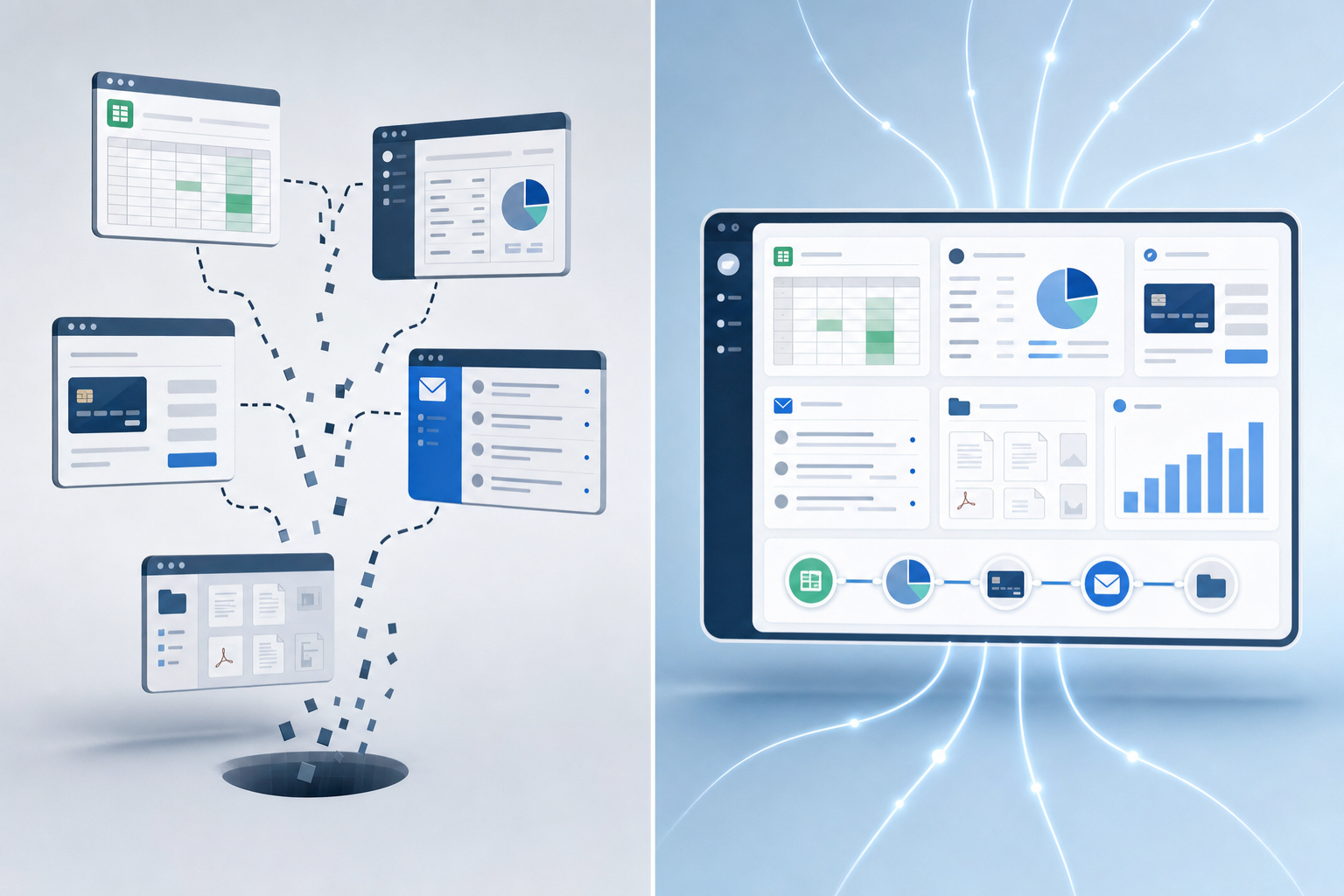
Bankruptcy case management software should close those gaps natively, not through brittle Zapier connections:
- Native payments through Stripe and Confido so retainers, payment plans, and refunds live inside the case workflow
- QuickBooks sync that pushes invoices and unapplied payments without duplicate entries
- PACER connectivity for automated court notice ingestion, 341 trustee assignments, and direct ECF submission
- Google Calendar and Microsoft Outlook two-way sync for hearing dates and consultation bookings
- Service-item mapping so revenue lands in the correct chart-of-accounts category
One record, fewer reconciliation hours.
How Real Bankruptcy Firms Currently Use Spreadsheets
Walk into most bankruptcy firms still on spreadsheets and the setup looks similar. One workbook holds tabs for Chapter 7 cases, Chapter 13 cases, a creditor master list, payment plan tracking, paralegal productivity, and a filing rate dashboard. Yellow cells mean documents pending. Green means ready to file. Red means trustee follow-up. Case assignments hide in a column that requires filtering before anyone can see who owns what.
It works at 15 cases. It bends at 50. It breaks at 100.
The deeper risk is the knowledge silo. One senior paralegal owns the master file, knows which formulas reference which tab, and which manual overrides keep totals accurate. When they leave, operations stall for weeks.
Automated Court Filing and PACER Integration
Spreadsheets cannot talk to PACER. That single fact creates hours of daily monitoring work that integrated systems remove. Paralegals refresh dockets, copy case numbers into tracking columns, transcribe 341 meeting details from email notices, and assemble ECF packets by hand.
Direct integration changes the math at four points:
- Court notices flow into the case workflow automatically, with trustee assignments, courtroom info, and Zoom details extracted as structured data
- Filing packets validate against district-specific requirements before submission, flagging issues as Approved, Needs Review, or Failed across 21 PACER document types
- ECF submission happens directly from the case, with real-time progress tracking and in-flight cancellation
- Case numbers, hearing dates, and docket updates surface inside the workflow instead of a paralegal's inbox
The result is a closed loop from intake to discharge.
Migration Path from Spreadsheets to Case Management Systems
Migration anxiety is real, and most firms handle the transition in phases rather than a clean cutover. Here's a sequence that works:
- Export current spreadsheets as CSV files, then map columns to case fields (debtor name, case number, retainer balance, document status)
- Translate custom status labels (your "yellow", "green", "red") into workflow stages with matching triggers
- Configure retainer collection and payment plan templates before importing active cases, so financial data lands correctly
- Run new intakes through the new system while in-flight cases finish on the old setup, keeping parallel operations for 30 to 60 days
- Train staff in 90-minute sessions tied to specific workflows, not the whole system at once
Expect a two-week productivity dip. It pays back inside a quarter. Comparing alternatives during migration planning helps set realistic transition timelines.
How Glade AI Replaces Spreadsheet-Based Bankruptcy Operations
We built Glade to handle what spreadsheets cannot. Workflows run from intake through discharge as one connected sequence, replacing the master tracker tab entirely. Custom statuses carry behavioral triggers (archive completed tasks, suppress follow-ups) that color-coded cells cannot match, and progress percentages calculate themselves as work completes.
Case list views sort by Progress, Status Change Date, Last Assignment Date, and Assignees, the four dimensions firms rebuild manually each week. The Paralegal Report surfaces filing rate per staff member with cases already segmented by preparation, filed, dropped, paused, and archived.
A few capabilities that close the spreadsheet gap:
- Conflict resolution flags when questionnaire data disagrees with case fields, offering one-click reconciliation instead of silent overwrites
- Payment gates block case progression until retainer milestones clear, turning billing into an embedded workflow rule
- PACER integration delivers court notices and 341 trustee assignments directly into the case
- Direct ECF filing closes the loop from intake to court submission inside one system
Final Thoughts on Choosing the Right Bankruptcy Software
Your spreadsheets got you here, but they won't scale past where you are now without hiring more people to maintain them. Best bankruptcy software for law firms automates document requests, means test calculations, and court filings so your paralegals can focus on cases instead of cell formulas. We built Glade because spreadsheets can't talk to PACER, can't gate payments, and can't run intake workflows without someone manually updating status columns. Book a demo and we'll show you what connected case management looks like.
FAQ
What are the best case management software options for bankruptcy law firms? Look for bankruptcy-specific systems with workflow automation from intake through discharge, native payment processing, PACER integration for court notices, creditor matrix tools with duplicate detection, means test calculators with district variables, and ECF filing. Generic practice management tools lack the structured data handling and jurisdiction-specific rules bankruptcy work requires whereas Glade.ai is built specifically for bankruptcy.
Can I migrate from spreadsheets without losing active case data? Yes. Export your current spreadsheet as a CSV file, then map columns (debtor name, case number, retainer balance, document status) to case fields in the new system. Run new intakes through the new software while finishing in-flight cases on spreadsheets for 30 to 60 days. Expect a two-week productivity dip that pays back inside a quarter.
How does automated workflow software differ from spreadsheet tracking for bankruptcy firms? Spreadsheets require paralegals to manually update status columns, send follow-up emails, and maintain formulas across 80+ cases. Automated workflow software runs document requests on schedule, parses paystubs at the cell level, surfaces stale cases in personal queues, and handles reminders without human input — shifting paralegals from executors to reviewers who handle exceptions and apply judgment.
How does PACER integration replace manual court monitoring? Direct PACER integration delivers court notices, 341 meeting details, and trustee assignments into case workflows automatically. Filing packets validate against district requirements before submission, ECF filing happens directly from the case with real-time progress tracking, and docket updates surface inside workflows without requiring paralegals to refresh dockets and transcribe notice emails manually.
When should a bankruptcy firm stop using spreadsheets? Spreadsheets work at 15 active cases, bend at 50, and break at 100. When document collection stalls because reminders depend on memory, payment plans drift out of sync with retainer agreements, or you rely on one senior paralegal who owns the master file, it's time to replace spreadsheets with connected workflows where intake data, documents, calculations, and filings share one record.